One certificate on two servers
What you'll have at the end: one certificate and one private key, served from two Scouts, renewing on one schedule and delivering itself to both boxes automatically — no more remembering to copy a file by hand after every renewal.
Prerequisites:
- Two enrolled, active Scouts — see Scout → Install procedure if either isn't set up yet. This guide calls them box A (where you'll order the certificate) and box B (the second server that also needs it).
- A DNS-01 renewal profile (manual or automatic) — replicated
certificates are DNS-01-only by policy:
HTTP-01and the internal CA cannot deliver to a second Scout at all, and Cyphers refuses to even let you pickHTTP-01here once box B's copy exists (more on why below). - Both boxes'
cert-dirs.confcovering the directory the certificate will live in on each of them, so their Scouts can see the file — see Track a new endpoint, Step 4. - Know every hostname the certificate needs to cover, and which box actually answers for each one.
Time: about 15 minutes, plus however long the one-time file copy takes you, plus a scan cycle (or trigger one) for the Hub to notice box B holds it.
Step 1 — Order the certificate on its owning Scout
On Manage, click + Add endpoint and fill in the form:
| Field | Value |
|---|---|
| Hostname | the first name the certificate should cover, e.g. api.example.com |
| Additional names | every other name it covers, one per line, e.g. sip.example.com |
| Port | 443 (or the port box A actually serves this name on) |
| Scout | box A |
| Renewal profile | your DNS-01 profile |
Click Add endpoint and let the first issuance close (drawer → Renewals tab: newest entry Closed). Box A is now this certificate's owner — the Scout its renewal is filed under, and will stay filed under, for as long as it keeps serving one of the names.
Step 2 — Copy the certificate and key to the second box, once
This is the one hand-copy the whole feature exists to make you never repeat.
On box A's managed directory, find the four files for this certificate
(fullchain.pem, cert.pem, chain.pem, privkey.pem — under
{data-dir}/certs/<domain>/, or {data-dir}/certs/_wildcard.<zone>/ for a
wildcard). Copy all four onto box B, at whatever path box B's own web server
or daemon reads from — exactly like adopting an existing
layout.
Point box B's TLS-terminating service at these files and reload it once by hand. This copy happens between the two boxes directly — the Hub never sees the private key at any point, before or after this step.
Where box B's Scout will eventually keep its own copy
Deliveries from the Hub land in box B's managed directory,
{data-dir}/certs/<name>/, not wherever you put the files just now.
You do not have to create that directory or guess its name: Step 4 has
the Hub tell box B's Scout to copy the key it can already see into it.
Your service can keep reading from the path it reads from today —
Scout-side symlinks are the usual way to bridge the two, and the
adopt-an-endpoint guide covers the layouts.
Make sure box B can see the file
If box B's Scout hasn't been told to watch this directory yet, add it to
cert-dirs.conf and reload the Scout (see Track a new
endpoint).
A directory the Scout was never told about is a directory it will not
read from or write to.
Step 3 — Let the Hub discover the second copy
Wait for box B's next scan cycle, or trigger one now (systemctl reload
cyphers-scout on box B, or Scan now on its Scout page) so it scans the
name it now serves.
You should now see, on Manage, box B join the certificate's Scout
column beside box A (box-a · box-b, on the rows it serves and in the
group header's union) — the Hub found it holding the same certificate at a
live path and saw it actually serving one of the names the certificate
covers. Open the endpoint's drawer and the Known certificates block
lists box B as a replica, Current.
Step 4 — Turn on key reuse, and prime box B
Two things have to be true before the next renewal, and one control does both.
First, key reuse: go to Settings → Certificate issuance → Renewal Profiles, open the profile you used, and enable Reuse private key across renewals (for pins/DANE). This matters the moment a replica exists, not before: the next renewal would otherwise generate a fresh key for box A alone, which would no longer match the key sitting on box B — and the Hub refuses that renewal outright rather than let it happen. See Key reuse and pinning.
Second, priming box B. Editing the profile in Settings changes the policy; it does not touch box B. Before the Hub can install anything on a Scout it has never delivered to, that Scout has to hold the key under the name Cyphers manages the certificate by — otherwise the delivery arrives, finds no key where it looks, and refuses. Priming is what puts it there, and it never moves a key anywhere: it tells box B's own Scout to copy the key it already has on disk into its managed directory.
Two things prime, and both are on Manage, not in Settings:
- Adopt on the certificate, if box B's endpoint isn't managed yet.
- Change renewal policy in the endpoint drawer's renewal-profile card — re-selecting the same reuse profile there is enough, and is the normal route when everything is already adopted.
If box B was enrolled after the profile was set
This is the common ordering, and it means box B was never primed by Adopt or by the profile change. Nothing to do: the convergence sweep notices, within a few minutes, that the Hub holds no proof of a managed key on box B, asks box B's Scout to adopt the key it already serves, and ships the certificate on that acknowledgement. Until then the row reads Behind with a note that the key is being primed. Re-selecting the reuse profile (Change renewal policy, or Adopt) still primes immediately if you would rather not wait.
If pre-flight asks you to Adopt key instead
That means the key isn't recognized as being under box A's own Scout management yet — run Adopt a private key first, then come back and enable reuse.
Step 5 — Renew, and watch both converge
Trigger Renew Now (or wait for the certificate's normal renewal window, or autopilot if it's enabled). The order itself runs exactly like any other renewal on box A. Once box A's install is acknowledged, the Hub ships the same new certificate and chain to box B — never the key, which stays exactly where it already was, and without waiting for box A's endpoint to verify on the wire — and box B's own Scout checks the delivered certificate against its on-disk key before installing it and reloading its own hook.
You should now see box B read Current in the drawer's Known certificates replica list within moments (briefly Delivering while the copy is in flight). Box A does not appear in that list at all: it is the owner, and the list is of the other Scouts holding the certificate.
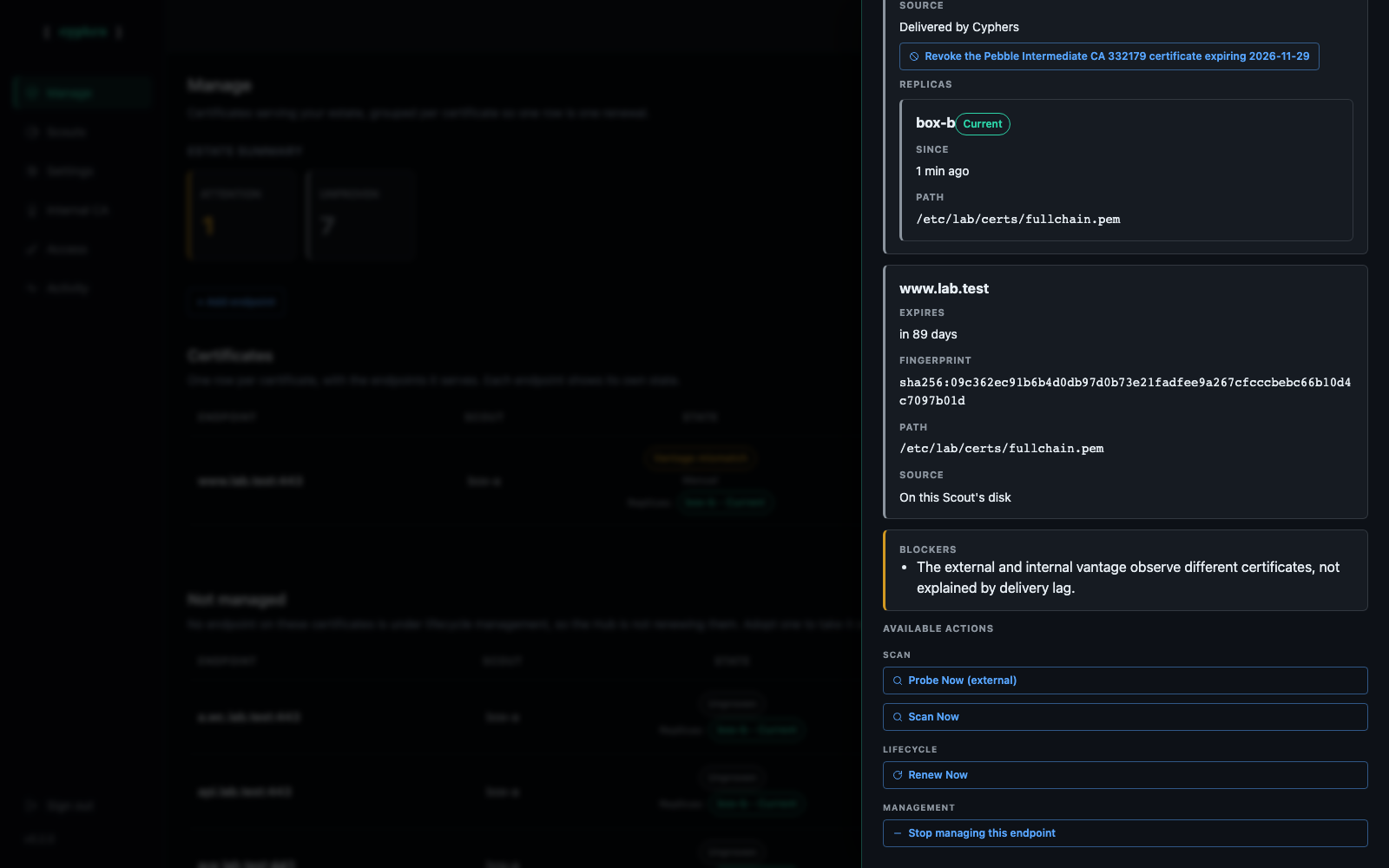
If box B reads Behind instead, with the note about the key not being adopted yet, it was never primed — the convergence sweep primes it on its next pass, as Step 4's tip describes, and delivers on the acknowledgement. From then on, every renewal on box A delivers itself to box B automatically, with nothing further to remember or repeat.
If a replica falls behind
If box B ever misses a delivery — offline at renewal time, a failed reload — its state reads Behind after about an hour, and the certificate's own row on Manage turns Action needed, naming box B. There is nothing to click: the Hub's convergence sweep re-sends the certificate the owner currently holds every few minutes until box B acknowledges it — the moment the box is back and its Scout is processing commands, it catches up on its own.
If the key on one side is ever rotated by hand
A replica's state reads Key differs when the last delivery attempt reached it but the certificate didn't pair with its on-disk key — almost always because that key changed outside of Cyphers since the last successful copy. The fix is the same either way: re-copy the current key from the owner (repeat Step 2), or remove the certificate from that box if it's no longer meant to serve it.
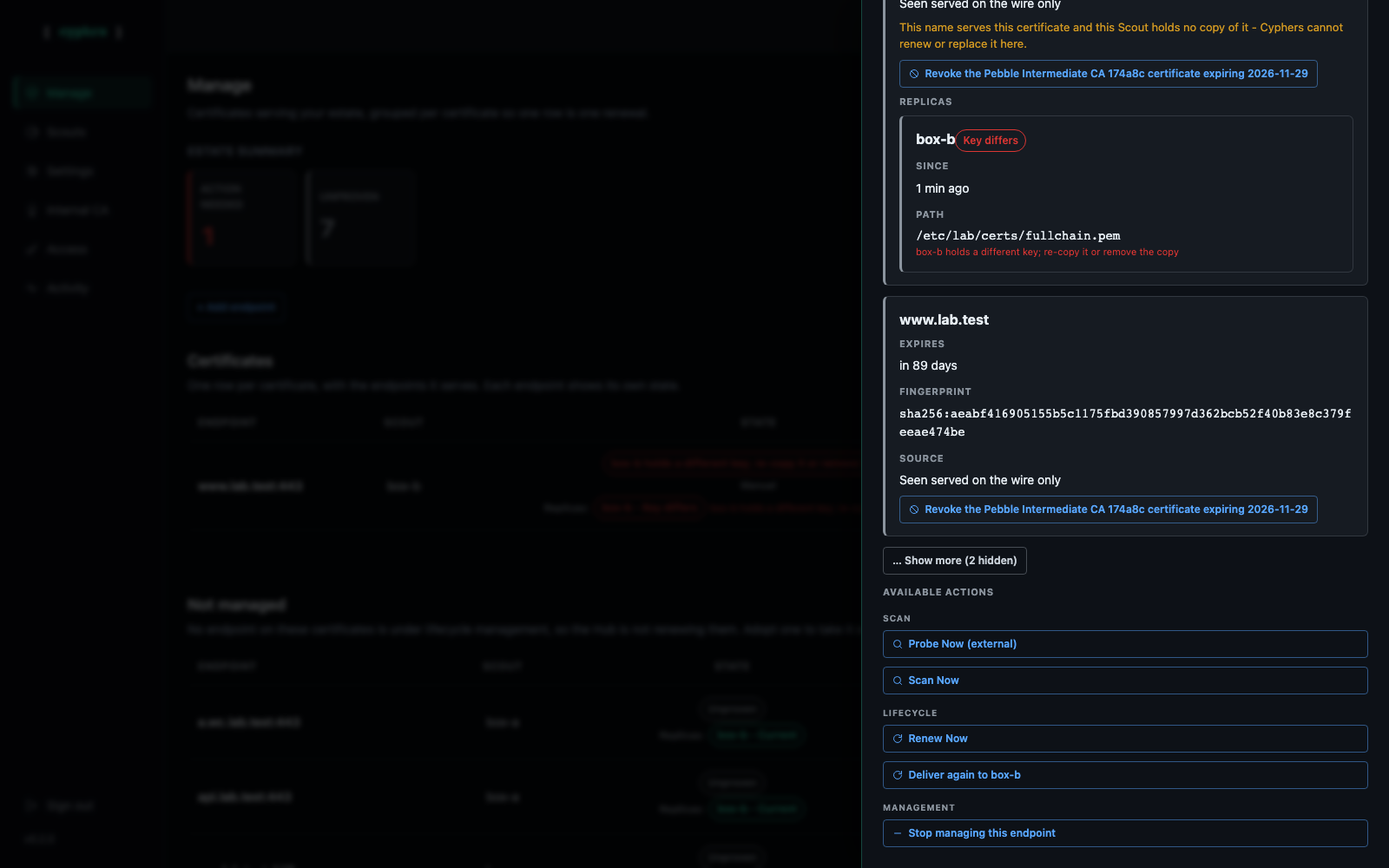
Renewing the owner's certificate while a replica is in this state is refused before any order is created — see the next section.
What refuses, and why
replicated_requires_dns01 fires earlier than the rest — at Adopt or
Policy, the moment you pick a renewal profile, not at renewal time — because
replicated certificates are DNS-01-only by policy (operator ruling
2026-08-31). The other four are renewal-time refusals.
| Refusal | Why | Fix |
|---|---|---|
replicated_requires_dns01 |
You picked (or the endpoint's assigned profile already is) HTTP-01 for a certificate that already has a replica. |
Pick a DNS-01 profile instead. |
replica_key_rotation |
The renewal would generate a fresh key while a replica holds the old one. | Enable Reuse private key across renewals on the profile (Step 4), or remove the replica's copy if it no longer needs the certificate. |
replica_key_mismatch |
A replica already holds a key that doesn't match — repairing that comes first, whatever this renewal's key policy is. | Re-copy the key to that Scout (Step 2), or remove its copy. |
replica_needs_hub_driven_lane |
The profile uses HTTP-01, which never hands the issued certificate back to the Hub — there's nothing to copy to a replica on that lane. |
Switch the profile to a DNS-01 method, or remove the copies if you don't need them delivered automatically. |
replica_check_failed |
The Hub could not work out whether this certificate has replicas at all. | A database problem, not a configuration one. Retry once the Hub is healthy; it refuses rather than risk stranding a replica. |
A convergence delivery has its own outcomes (Activity feed, not buttons):
no_presented_name means the covered-only wildcard case below, which no
delivery can fix; delivery_unavailable and no_certificate mean the Hub
does not hold something it would need to ship — usually the HTTP-01 lane,
which never hands the Hub a copy.
Full detail, exact message text, and every other refusal on Manage: Recover from refusals.
Related
- Replicated certificates — what a replica is, how it's discovered, and what it does and doesn't change.
- Key reuse and pinning — why reuse is required once a replica exists.
- Adopt a private key — bring an existing key under Scout management first, if pre-flight asks for it.
- Issue a wildcard certificate (DNS-01) — note the limit: a Scout that serves only a host a wildcard covers, rather than a name the certificate presents, is listed as a replica but never delivered to. See When a replica has to be updated by hand.
- Recover from refusals — every refusal message on Manage, including the four above.